

 Digital Transformation

 Technical Strategy Services
 Foundational Strategy Services
 Information Architecture
 Content Experience & Strategy
 Bitrix24 For Business Automation
 Software Development
 Custom Application Development
 Mobile Application Development
 E-commerce Development
 Website Development
 UI/UX Audit of Site Usability
 Website Technical Support
 Digital Marketing
 Marketing Automation Services
 Search Engine Optimization (SEO)
 Content Marketing & Copywriting
 Paid Search & PPC Management
 Social Media Marketing
 Email Marketing Services
 Research
 Brand Health Research
 Analysis of Brand Competitors
 Target Audience Analysis
 Testing of Design and Concept
 Analytics Setup & Data Analysis
 Foundational Strategy Services
 Information Architecture
 Content Experience & Strategy
 Bitrix24 For Business Automation
 Custom Application Development
 Mobile Application Development
 E-commerce Development
 Website Development
 UI/UX Audit of Site Usability
 Website Technical Support
 Marketing Automation Services
 Search Engine Optimization (SEO)
 Content Marketing & Copywriting
 Paid Search & PPC Management
 Social Media Marketing
 Email Marketing Services
 Brand Health Research
 Analysis of Brand Competitors
 Target Audience Analysis
 Testing of Design and Concept
 Analytics Setup & Data Analysis

 Expertise Overview
 Digital Transformation
 Software Development
 Digital Marketing
 Research
 Products Overview
 Solutions Overview
 Real Estate CRM
 Hospitals CRM & Bookings
 Retail Digital Transformation
 Marketing Automation
 Tasks & Projects
 HR Automation
Saabsoft Launches ChatBridge24: WhatsApp Business API for Teams and Bitrix24
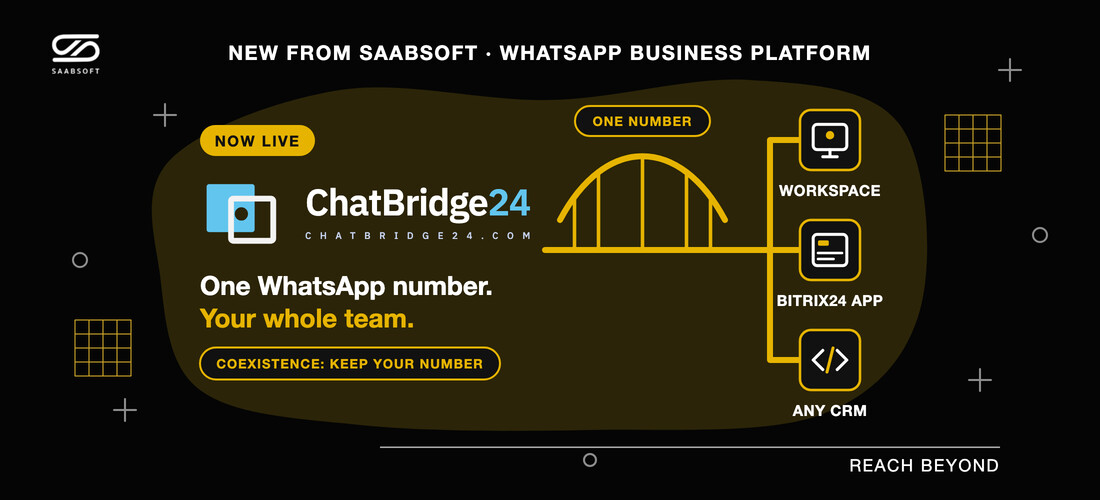
Saabsoft has launched ChatBridge24, a WhatsApp platform on Meta's official API: a shared inbox, approved templates, a chatbot and campaigns on one number, with coexistence and a full app on the Bitrix24 Marketplace.
Saabsoft has launched ChatBridge24, a WhatsApp platform for teams that have outgrown a single phone. It runs on Meta's official WhatsApp Business API, it lets you keep the number your customers already know, and it is available on its own or as the ChatBridge24 Bitrix24 App on the Bitrix24 Marketplace. For companies on Bitrix24 UAE portals, it brings WhatsApp conversations straight into Open Channels and the CRM.
Why Saabsoft built it
Many business WhatsApp numbers still live on one handset. When the person holding it is away, nobody else can answer. Moving to the API used to mean giving up the app, and tools that charge per seat make the bill grow with every new agent. ChatBridge24 is built to remove those trade-offs: one connected number, your whole team on it, and no charge per user.
It is built and operated by Saabsoft Technologies in Dubai, a software company with a long-standing focus on Bitrix24, so support and data requests reach the people who maintain the product. ChatBridge24 is also an approved Meta Tech Provider.
Three ways to use ChatBridge24
- A standalone workspace. No CRM is needed. Your team works in the shared inbox, with templates, campaigns, the chatbot and the API.
- A full Bitrix24 app. Installed from the Bitrix24 Marketplace, it adds Open Channels, a WhatsApp tab on CRM records, automation steps and the bot to your portal.
- Any other CRM. A signed webhook posts each new message to your CRM, and on the Enterprise plan the REST API sends approved templates back.
Keep your number with WhatsApp coexistence
The standout feature is WhatsApp coexistence. For years a number was either on the WhatsApp Business app or on the API, never both. Meta has changed that, and ChatBridge24 supports it: the number stays in the app on your phone and is connected to the platform as well. There is no SMS code and no PIN, because the number is never re-registered.
Customers see the same number and the same name. A reply you type on the phone appears in the team inbox, marked as sent from the phone, and a reply a colleague sends from the inbox appears on the phone. When you connect:
- Every contact in the app that has a WhatsApp number is imported.
- The last six months of one-to-one chats come across if you allow it, along with photos and files from the last 14 days.
- Group chats and voice and video calls stay on the phone, and existing broadcast lists become read-only.
- The WhatsApp Business app must be version 2.24.17 or later. If it is not opened for about 14 days, Meta disconnects the number from the platform.
Everything runs on one number
One connected number carries every feature, for the whole team:
- WhatsApp shared inbox. One thread per customer, with assignment, labels, internal notes, saved replies and search, and the 24-hour window and delivery state shown on every message.
- Approved templates. Draft, submit and track Meta-approved templates in the app, including media headers, buttons and named values.
- WhatsApp chatbot. A flow you draw with no code: ask a question, branch on the answer, wait, or hand over to a person. Try it in a test chat that sends nothing, then publish.
- Marketing campaigns. Send an approved template to an audience you build, paced within the sending hours you set, with a frequency cap and a result for every recipient.
- REST API and signed webhooks. A documented API for your numbers, templates and messages, with scoped keys, plus webhooks for each new message and delivery status.
Built for teams on Bitrix24
The ChatBridge24 Bitrix24 App registers itself as an Open Channels connector, so your existing queues and routing rules decide who answers. Operators reply from Bitrix24, and delivery and read ticks come back to their messages. It also adds:
- A WhatsApp tab on the Lead, Deal, Contact and Company cards, so agents read and reply without leaving the record.
- Automation steps that send an approved template filled from the record's own fields.
- Records created from a first message: a Lead, a Contact or a Smart Process item. A Lead or a Contact also gets the campaign details and UTM values.
- Clear reasons on the CRM timeline when a rule could not send, where the person who can fix it will see them.
- Inbound messages held for up to 30 days while you finish setting up, rather than failed.
The app works on Bitrix24 cloud portals and on Bitrix24 On-Premise. Real estate companies can run it beside Property Listing From Bitrix24, Property Management in Bitrix24 and Real Estate Developers in Bitrix24 as part of Saabsoft's Real Estate CRM, so the conversation and the contract belong to the same contact.
Simple pricing per number
ChatBridge24 charges per connected number, with your whole team included and no per-seat charge. The three plans are:
- Starter: $50 per number a month, or $40 on annual billing. The shared inbox, approved templates, the Bitrix24 app, API keys and signed webhooks.
- Professional: $80 per number a month, or $64 on annual billing. Everything in Starter, plus the advanced bot.
- Enterprise: $119 per number a month, or $95.20 on annual billing. Everything in Professional, plus marketing campaigns and template sends from your own systems through the REST API.
Meta bills its own message charges to you directly, at its published rates, with nothing added. Since 1 October 2026, the first 1,000 service messages a month on each business number are free. What you type in the WhatsApp Business app on a coexistence number also stays free. The current plans are on ChatBridge24 pricing.
Your account and your data
Your WhatsApp Business Account stays yours: you connect it with your own Facebook sign-in, Meta bills it directly, and you can leave and keep the number. ChatBridge24 is hosted in the EU, and its privacy policy rules out using message content or contact data for advertising, profiling, resale or training machine-learning models.
How to get started
- Install the app from the Bitrix24 Marketplace, or create an account on ChatBridge24 if you do not use a CRM.
- Connect a number through Meta's own sign-up flow, with no tokens to paste, or choose "Add Business App number" to keep your WhatsApp Business app number through coexistence.
- Bind the number to an Open Channel, so your existing queue and routing rules apply.
Saabsoft is an official Bitrix24 Dubai partner, so the team that built the app can connect the number with you, set up the first templates and automation rules, and train the people who will answer.
Frequently asked questions
What is ChatBridge24?
ChatBridge24 is a standalone WhatsApp platform for teams, also available as a full app on the Bitrix24 Marketplace. Other CRMs connect to it over its REST API and signed webhooks. It is built by Saabsoft Technologies in Dubai.
Can I keep my current WhatsApp number?
Yes, if it is on the WhatsApp Business app. It connects through coexistence and stays in the app on your phone. A number used in the consumer WhatsApp app cannot stay there once it is on the platform.
Do I need Bitrix24 to use it?
No. ChatBridge24 works on its own as a standalone workspace, and any other CRM can connect through the REST API and signed webhooks. The ChatBridge24 Bitrix24 App is there for teams that already work in Bitrix24.
How much does it cost?
From $40 per connected number a month on annual billing, with no per-seat charge. Meta's message charges are billed by Meta separately, with nothing added.