

 Digital Transformation

 Technical Strategy Services
 Foundational Strategy Services
 Information Architecture
 Content Experience & Strategy
 Bitrix24 For Business Automation
 Software Development
 Custom Application Development
 Mobile Application Development
 E-commerce Development
 Website Development
 UI/UX Audit of Site Usability
 Website Technical Support
 Digital Marketing
 Marketing Automation Services
 Search Engine Optimization (SEO)
 Content Marketing & Copywriting
 Paid Search & PPC Management
 Social Media Marketing
 Email Marketing Services
 Research
 Brand Health Research
 Analysis of Brand Competitors
 Target Audience Analysis
 Testing of Design and Concept
 Analytics Setup & Data Analysis
 Foundational Strategy Services
 Information Architecture
 Content Experience & Strategy
 Bitrix24 For Business Automation
 Custom Application Development
 Mobile Application Development
 E-commerce Development
 Website Development
 UI/UX Audit of Site Usability
 Website Technical Support
 Marketing Automation Services
 Search Engine Optimization (SEO)
 Content Marketing & Copywriting
 Paid Search & PPC Management
 Social Media Marketing
 Email Marketing Services
 Brand Health Research
 Analysis of Brand Competitors
 Target Audience Analysis
 Testing of Design and Concept
 Analytics Setup & Data Analysis

 Expertise Overview
 Digital Transformation
 Software Development
 Digital Marketing
 Research
 Products Overview
 Solutions Overview
 Real Estate CRM
 Hospitals CRM & Bookings
 Retail Digital Transformation
 Marketing Automation
 Tasks & Projects
 HR Automation
REAL ESTATE DEVELOPERS IN BITRIX24
From available unit to signed SPA, in one system inside Bitrix24
Real Estate Developers in Bitrix24 is Saabsoft's sales and inventory app for UAE developers whose sales team works in Bitrix24 CRM, selling directly or through external brokerages. It replaces inventory spreadsheets, double-booked units, offers and SPAs typed by hand, payment schedules in Excel, commission disputes and approvals over WhatsApp with one system that holds your live inventory, runs every sale from Offer to Booking and SPA with an optional EOI step, generates branded contracts, builds payment schedules, tracks collections and commissions, routes approvals, publishes a public showroom and keeps your Bitrix24 deals up to date: leads become deals, each sale gets its deal with the buyer attached as a contact, and the deal moves through the stages you mapped. It is built around UAE practice: AED pricing, DLD and admin fees, Emirates ID and bilingual Arabic and English contracts, and it extends your Real Estate CRM in Bitrix24 with the developer side of the business. As a Bitrix24 partner for Bitrix24 UAE and Bitrix24 Dubai developers, Saabsoft activates the app in your portal and sets up your projects.
EVERY UNIT, EVERY SALE, INSIDE BITRIX24
THE WHOLE SALE, OFFER TO SPA
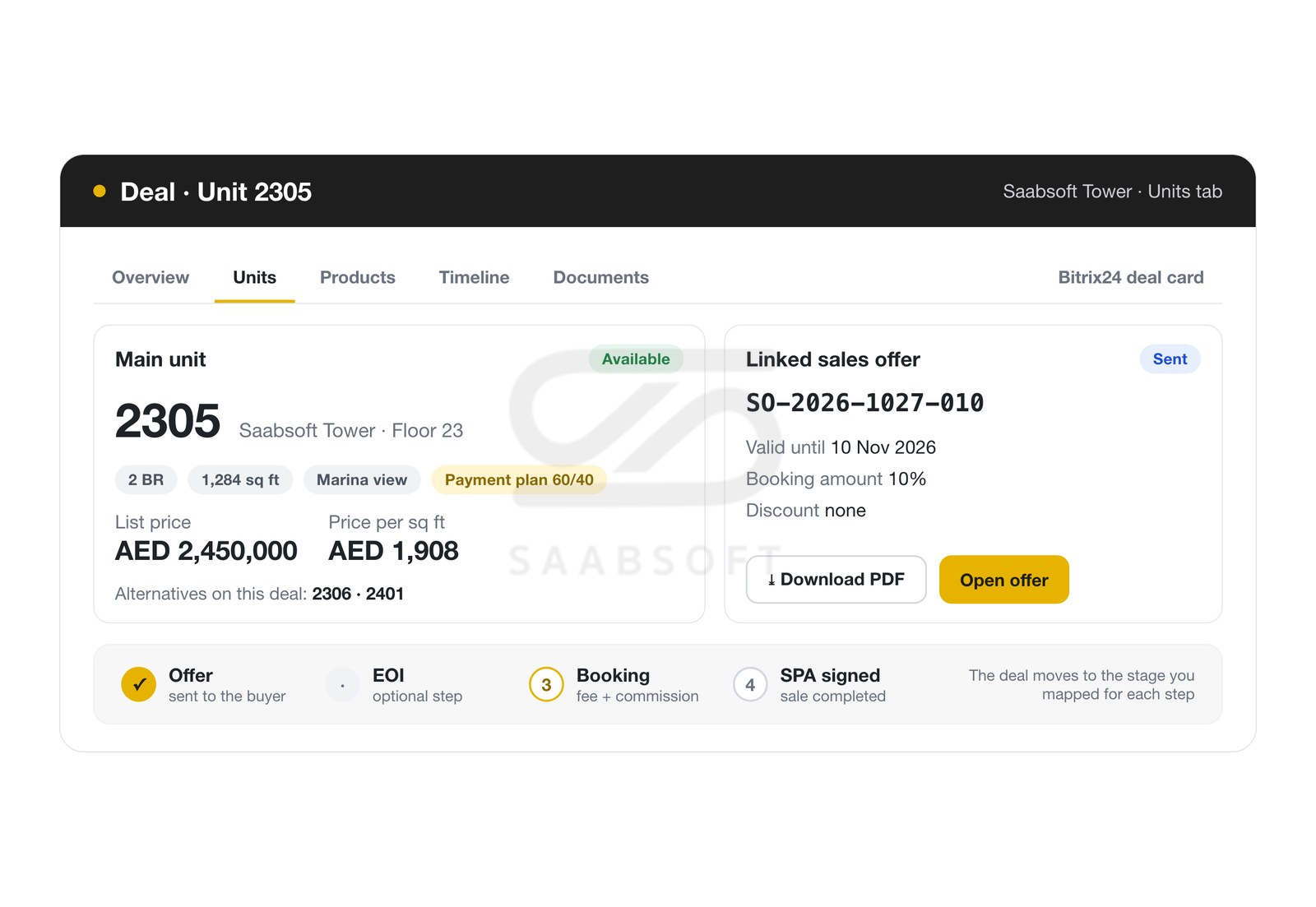
Agents issue a sales offer from any available unit with the project's payment plan, discount and booking amount, linked to an existing client or straight to a Bitrix24 deal or lead. An accepted offer holds the unit and closes competing offers, the optional EOI, the booking and the sale follow with automatic unit status and timers, and uploading the signed SPA completes the sale. Holds expire after the hours you set and the unit frees itself, while built-in guards allow only one live booking or sale per unit, so a unit is never booked twice and no agent can take over a unit a colleague is holding.
THE WHOLE SALE, OFFER TO SPA
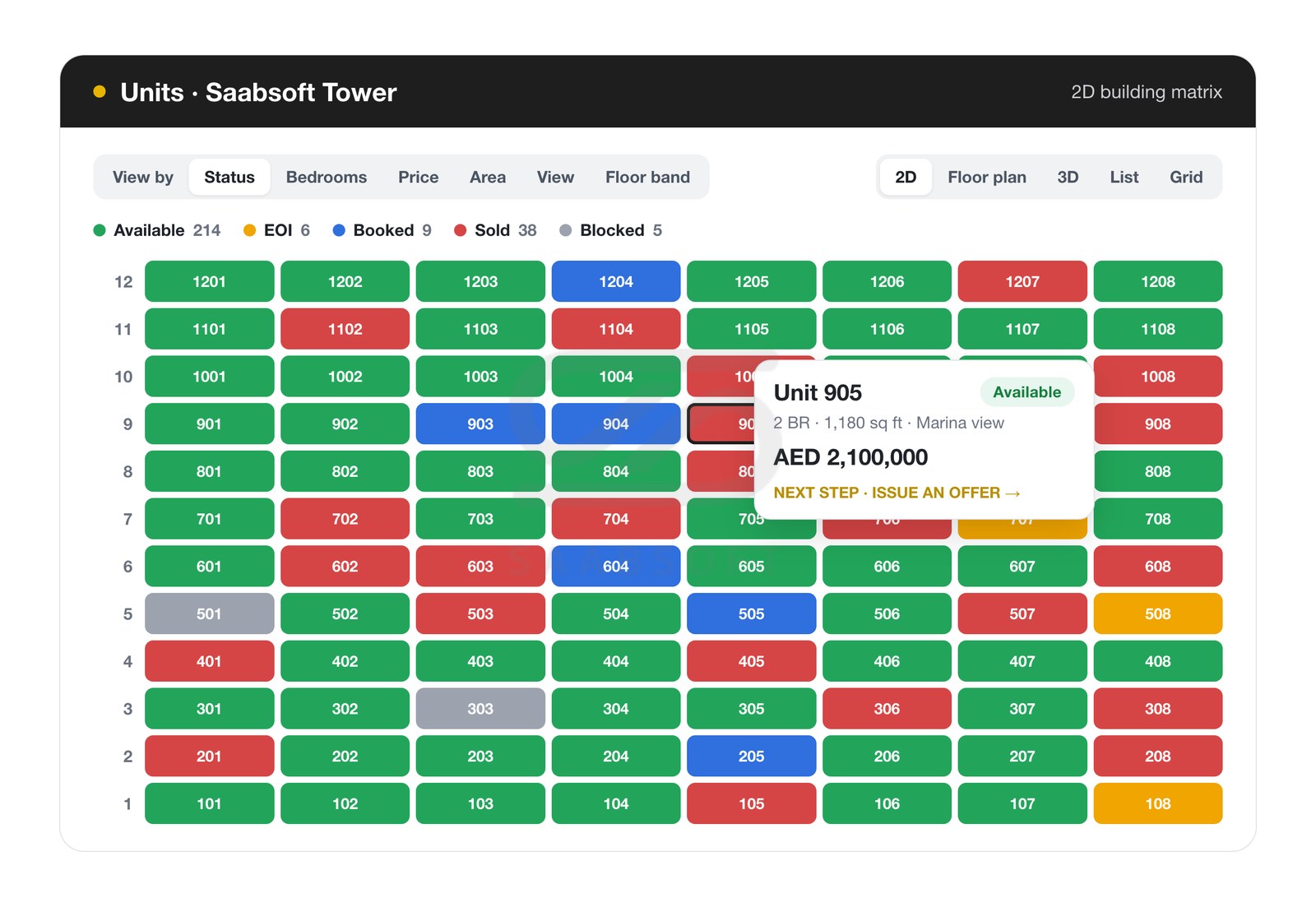
Live Unit Inventory in 2D and 3D
Browse each project up to five ways: a 2D building matrix of floors and units with colour heat-maps by status, bedrooms, price, area, view or floor band; interactive floor plans with clickable units; a 3D tower you drag to rotate; a list; and a card grid. Hover any unit for a summary and its recommended next action, and filter by status, floors, bedrooms, view, price, area or your own pipeline. Units move automatically from Available to EOI, Booked and Sold, and show as Blocked while an accepted offer or a manual block holds them.
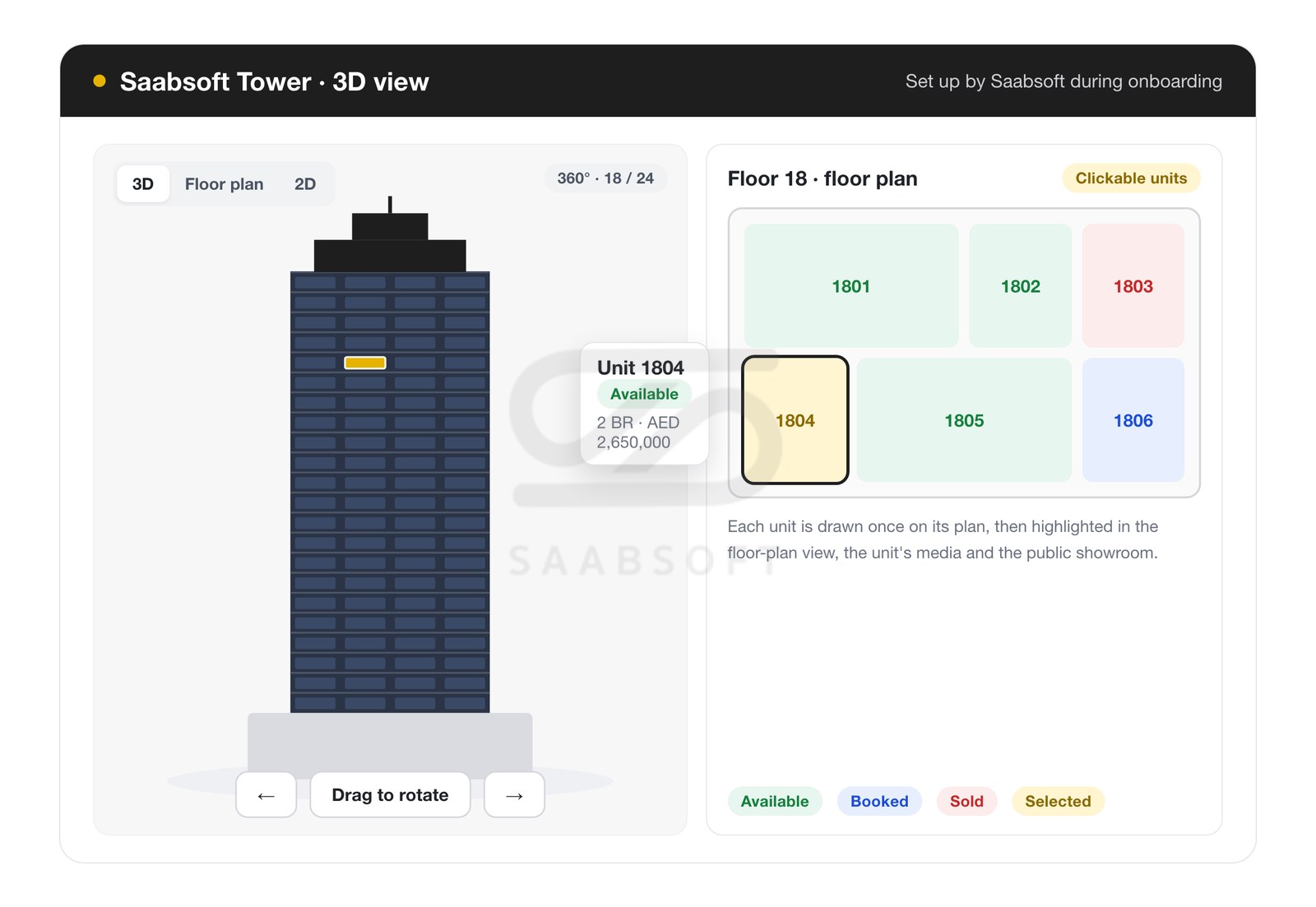
Interactive 3D Tower and Floor Plans
Each unit's shape is drawn once on its floor plan and then appears in the floor-plan view, in the unit's media and highlighted on your public showroom. The 3D tower is a 360-degree turntable with your units mapped as clickable areas on the building, set up by the Saabsoft team during onboarding from your 3D model, your own rendered turntable video or your rendered images.
Sales Offers, EOI, Booking and SPA
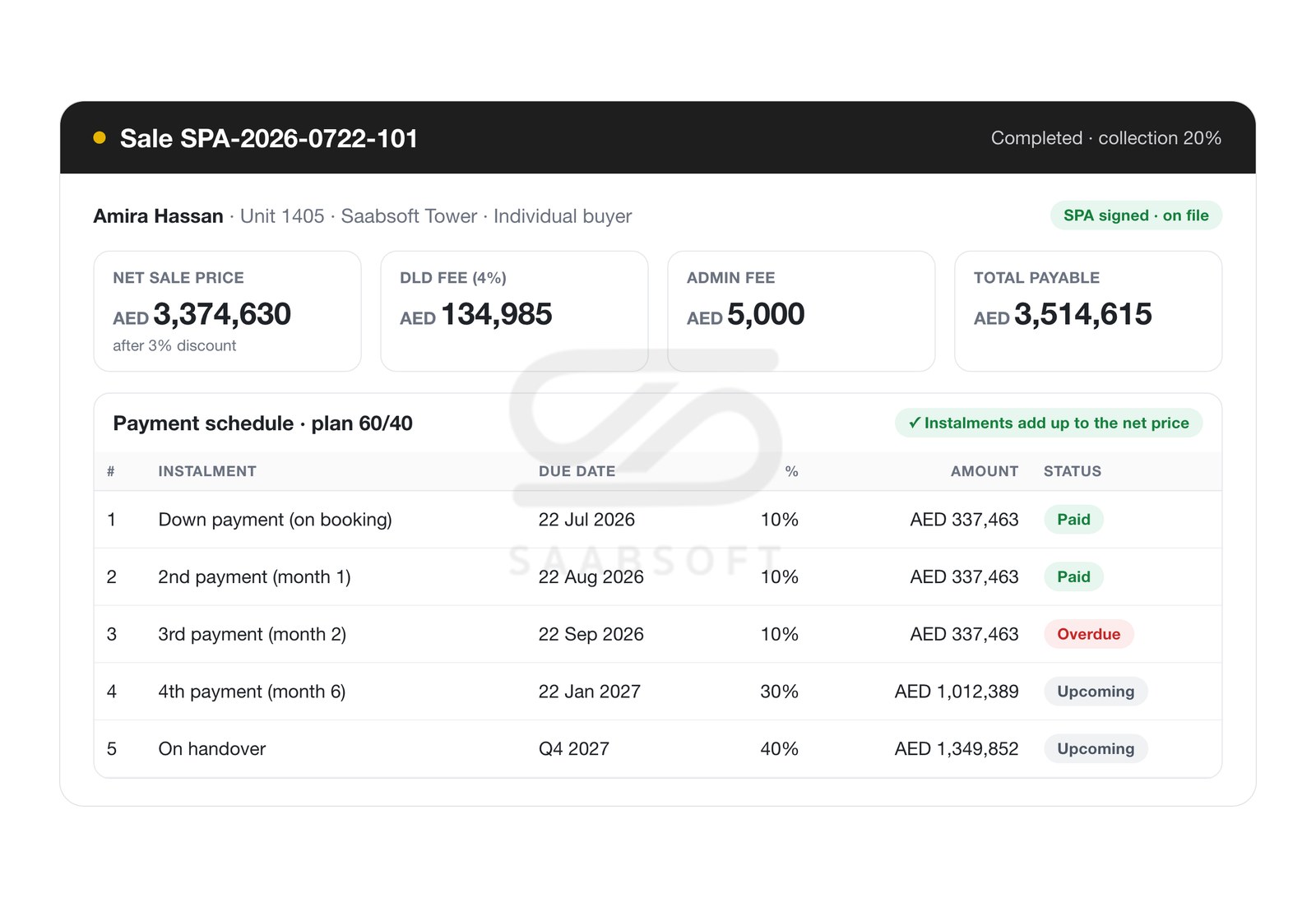
One offer can cover several units, with a validity period and automatic expiry. Expressions of interest can require buyer documents by residency, bookings carry the booking fee and agent commission, and the sale builds its payment schedule from the plan with a live preview that confirms the instalments add up to the net price, or warns if they don't, together with DLD and admin fees and the total payable. Buyers can be individual, joint with ownership shares, or corporate, several agents can share a deal, sales can come from internal agents or an external agency, and cancelling at any stage releases the unit and voids what was not yet paid.
Payment Plans and Collections
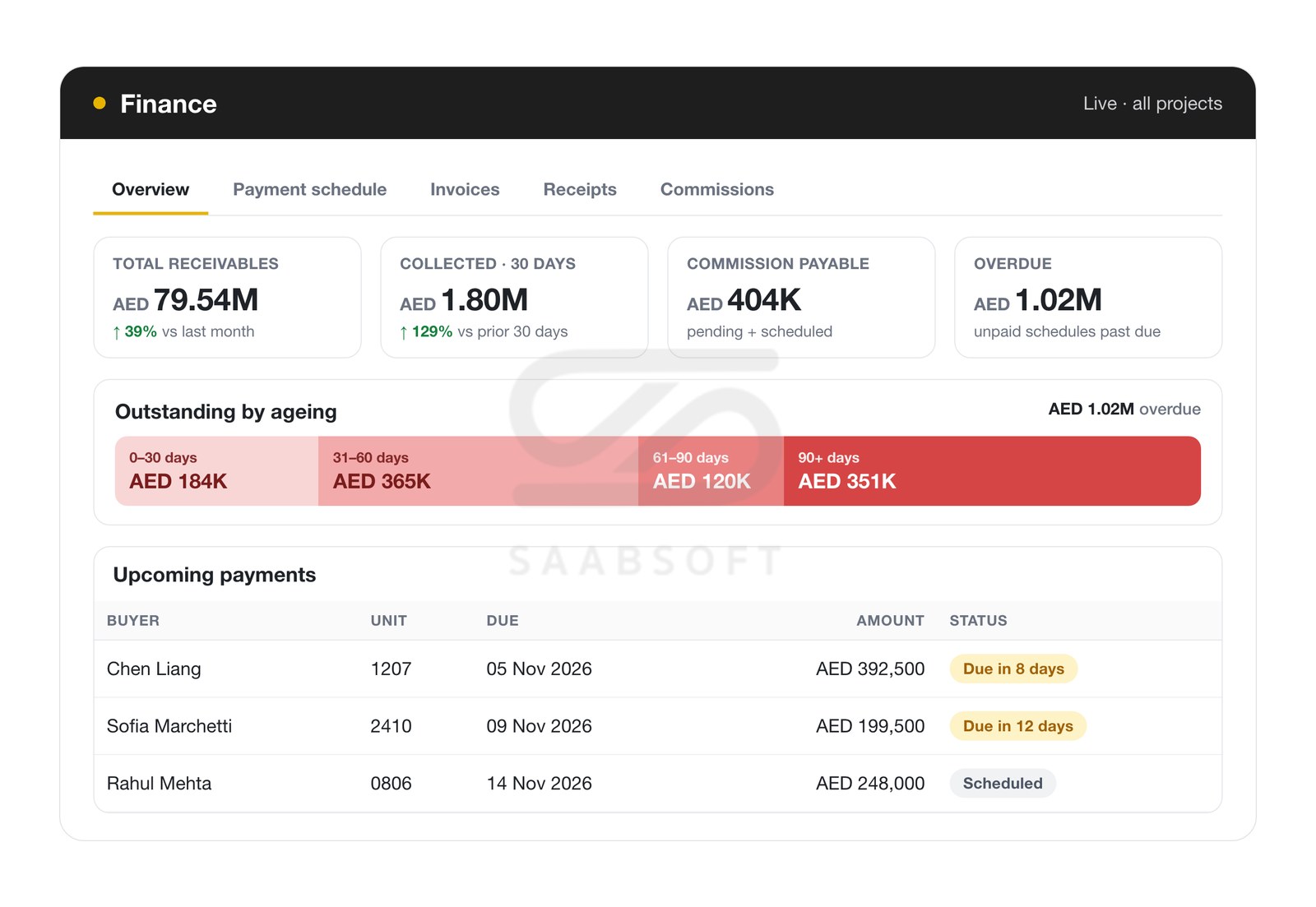
Define named payment plans per project with instalments due on booking, a number of months or days after booking, on SPA, on handover, after handover or on completion, together with DLD, admin and other fees. Record payments with overpayment protection, issue receipts with proof of payment and invoices from instalments, and follow receivables, collections, overdue amounts, ageing buckets and upcoming payments in the finance hub, with VAT per unit or as a company default.
Commissions and Agent Targets
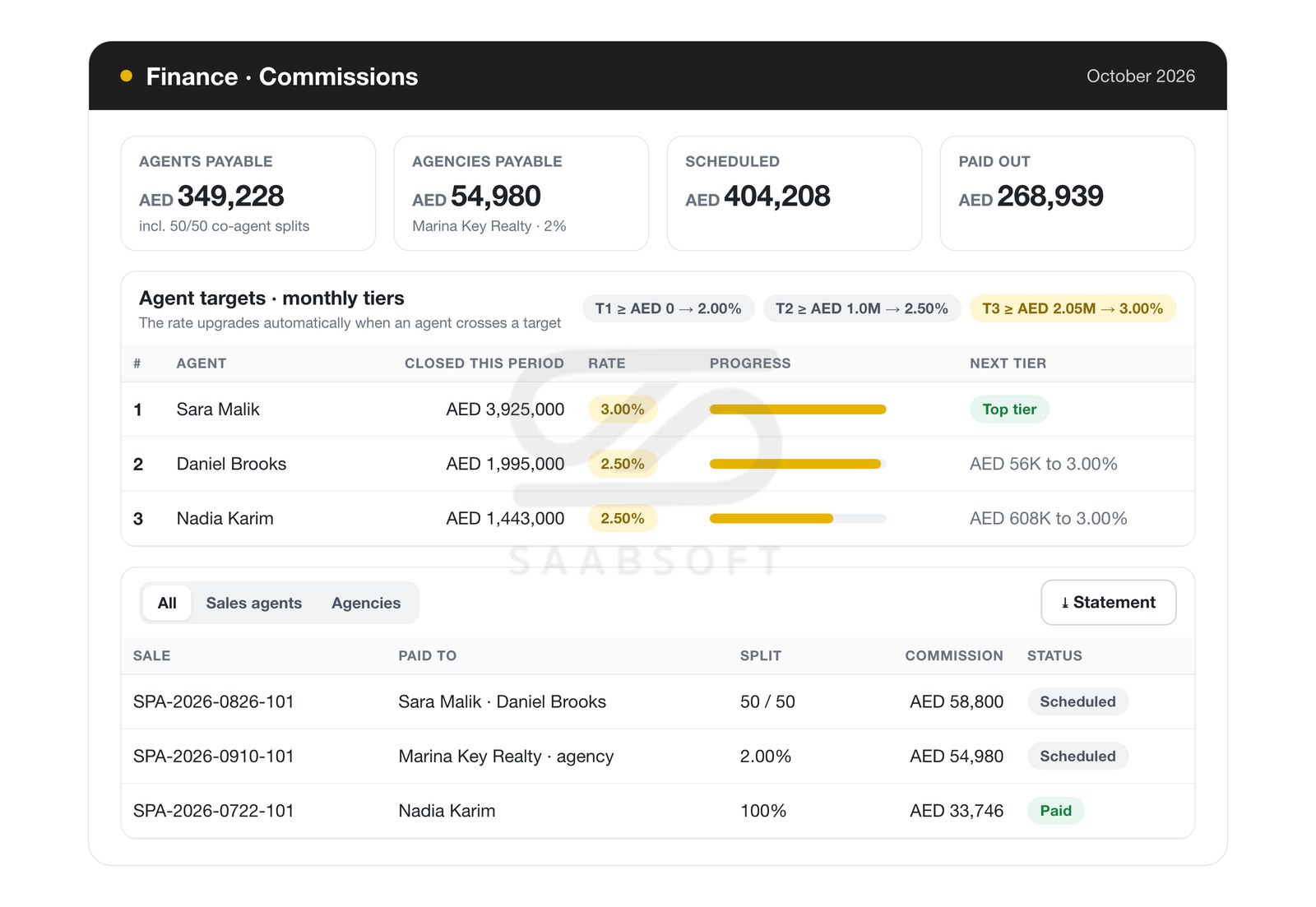
Commissions are calculated automatically on every sale and split across co-agents, from the rate on the deal, the agent's target tier, the agent's own rate or the company default, with per-agency rates for external brokerages. Optional target-based tiers per month, quarter, half-year or year upgrade an agent's rate as soon as they cross a target, and commission statements and agency settlement exports keep every payout clear.
Approvals Your Way
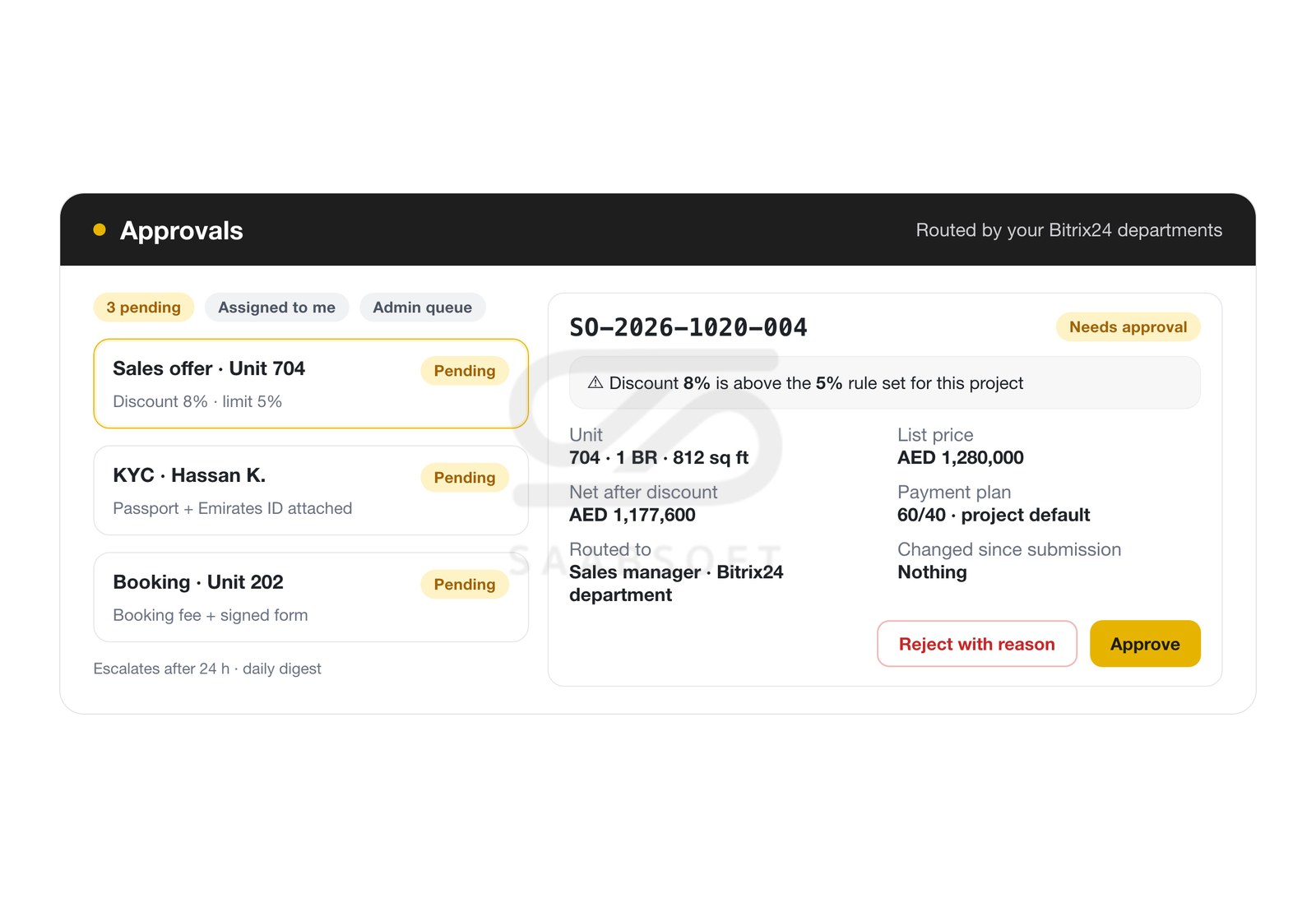
Choose what needs approval: offers with a discount above a set percentage or a price above a set amount, non-default payment plans, custom offers, KYC, EOI, booking, sale, signed documents and unit blocks. Requests go to the submitter's manager from your Bitrix24 departments or to named approvers, who see the full deal context in the approvals inbox, with escalation after a set time and a daily digest. Nobody approves their own request, and a record waiting for approval stays locked.
Document Studio for SPAs, Offers and Receipts
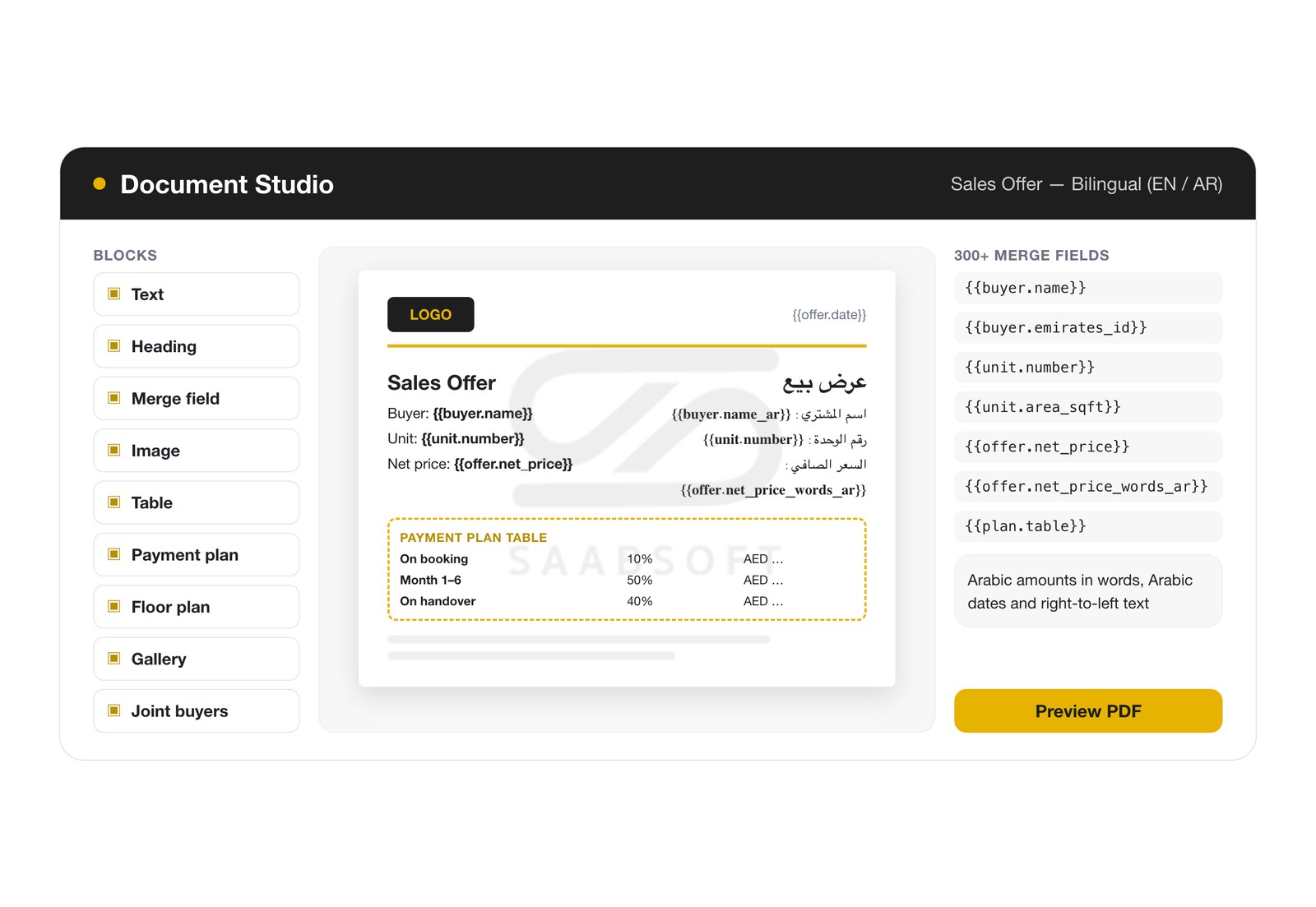
Design branded documents with drag and drop: text, tables, images, the payment-plan table, the unit's floor plan and photo gallery, with more than 300 merge fields including Arabic amounts in words and Arabic dates, right-to-left text and your own brand fonts. Ready-made templates cover the sales offer, EOI, booking form, SPA, KYC, invoice and receipt, and if you keep separate templates for individual, joint and corporate buyers, the right one is picked automatically. Your own fillable PDF forms can be used as they are, and your own long SPA can have the generated pages merged into it. Our team builds your more complex developer contracts with you.
Public Showroom for Buyers and Brokers
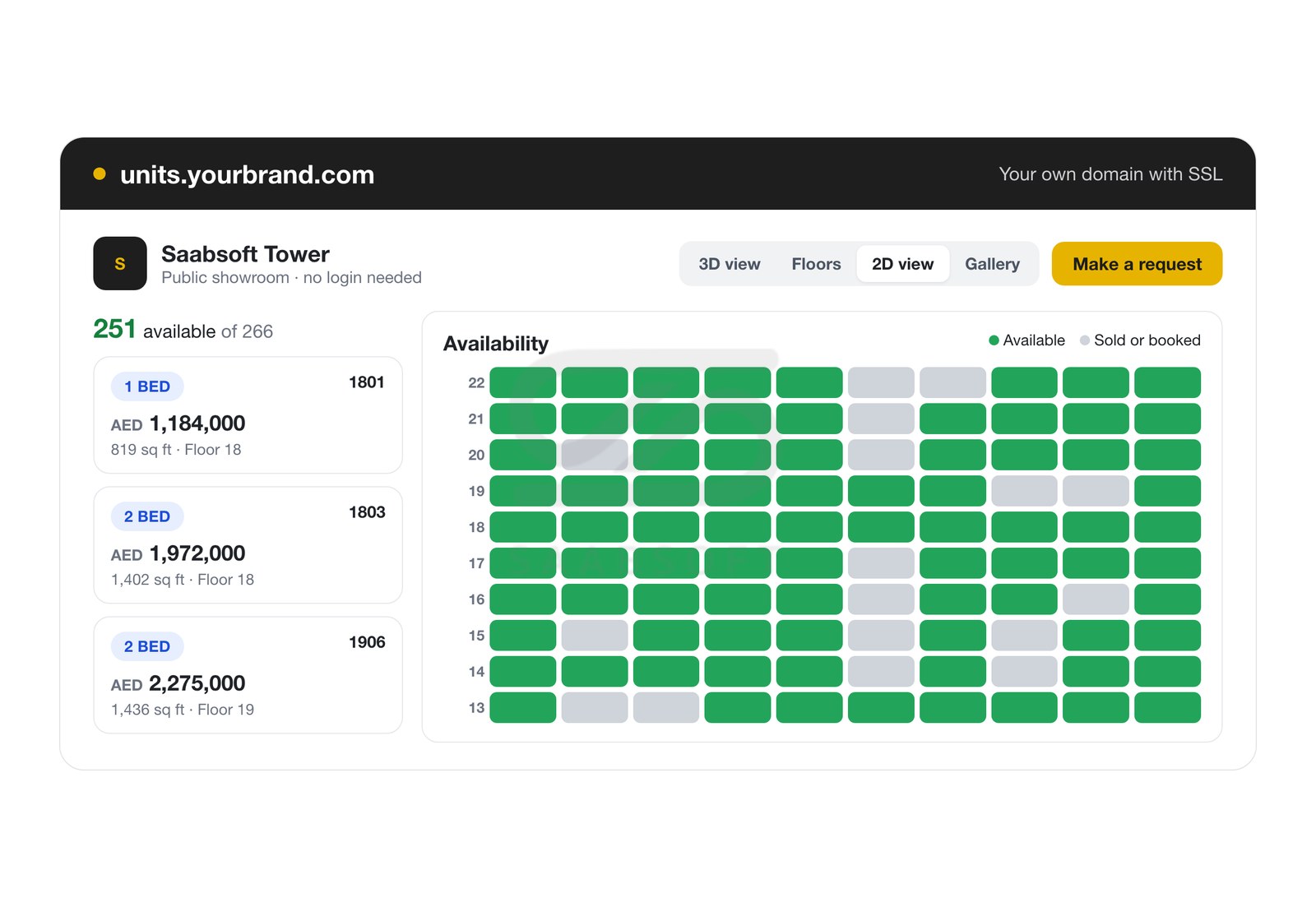
Share a private link to each project, or publish it on your own domain with SSL. Visitors need no Bitrix24 account: the showroom opens on the 3D tower when the project has one, offers floor plans, the 2D matrix and a gallery, and shows only availability, with sold and booked units greyed out. A "Make a request" form sends the enquiry to your Bitrix24 as a lead or Smart Process item with the unit attached, and inside the app matches or creates the client, assigns an agent in rotation and opens a draft offer.
BUILT FOR REAL ESTATE DEVELOPERS
Bitrix24 Integration
- Opens from the Bitrix24 left menu with Bitrix24 sign-in
- A Units tab on every Lead, Deal and Smart Process card
- Deals move to your mapped stages on each sale event
- Leads convert to deals once an offer is accepted or an EOI, booking or sale is made
- Bitrix24 cloud and on-premise portals
Buyers and KYC
- Individual and corporate buyer profiles with Arabic names, and joint buyers with ownership shares
- Passport, Emirates ID and visa with numbers and expiry dates
- KYC status with optional manager approval
- Duplicate prevention by phone number
- Reminders before and after ID documents expire
Dashboard and Reports
- Revenue, units sold, collected and outstanding
- Sales funnel with its biggest drop-off highlighted
- Alerts for expiring offers, overdue payments and pending KYC
- Project summary, collection, agent performance, revenue and overdue reports
- Agents see their own figures, managers their team's
Security, Access and Mobile
- Permissions per module with own, department or all scope
- Projects and payment plans hidden from chosen roles
- Encrypted in transit and at rest, with daily database backups kept for 14 days
- Works inside the Bitrix24 mobile app
- Statuses and approvals update live, without refreshing