

 Digital Transformation

 Technical Strategy Services
 Foundational Strategy Services
 Information Architecture
 Content Experience & Strategy
 Bitrix24 For Business Automation
 Software Development
 Custom Application Development
 Mobile Application Development
 E-commerce Development
 Website Development
 UI/UX Audit of Site Usability
 Website Technical Support
 Digital Marketing
 Marketing Automation Services
 Search Engine Optimization (SEO)
 Content Marketing & Copywriting
 Paid Search & PPC Management
 Social Media Marketing
 Email Marketing Services
 Research
 Brand Health Research
 Analysis of Brand Competitors
 Target Audience Analysis
 Testing of Design and Concept
 Analytics Setup & Data Analysis
 Foundational Strategy Services
 Information Architecture
 Content Experience & Strategy
 Bitrix24 For Business Automation
 Custom Application Development
 Mobile Application Development
 E-commerce Development
 Website Development
 UI/UX Audit of Site Usability
 Website Technical Support
 Marketing Automation Services
 Search Engine Optimization (SEO)
 Content Marketing & Copywriting
 Paid Search & PPC Management
 Social Media Marketing
 Email Marketing Services
 Brand Health Research
 Analysis of Brand Competitors
 Target Audience Analysis
 Testing of Design and Concept
 Analytics Setup & Data Analysis

 Expertise Overview
 Digital Transformation
 Software Development
 Digital Marketing
 Research
 Products Overview
 Solutions Overview
 Real Estate CRM
 Hospitals CRM & Bookings
 Retail Digital Transformation
 Marketing Automation
 Tasks & Projects
 HR Automation
WhatsApp Business API in Bitrix24: A Practical Guide for UAE Teams
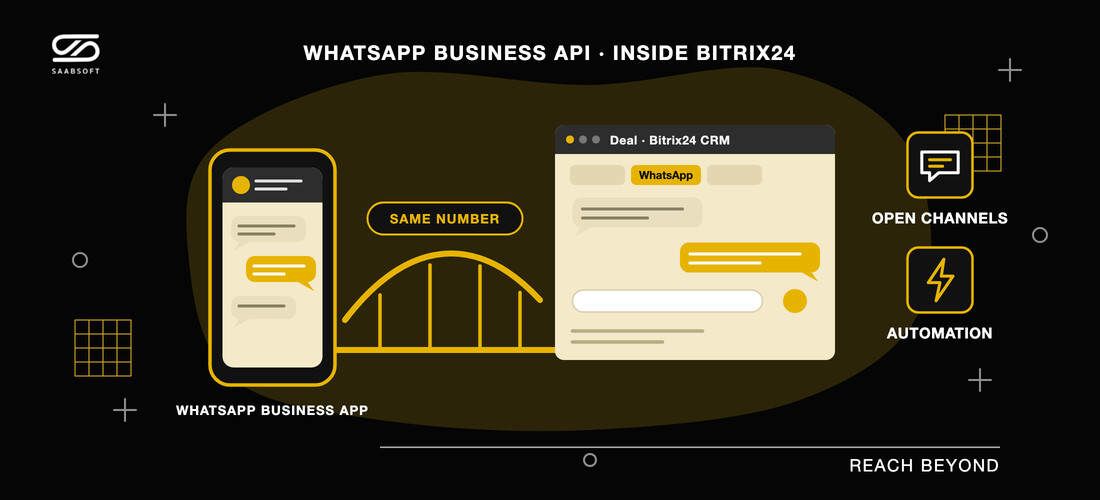
How UAE companies connect WhatsApp to Bitrix24 through the official WhatsApp Business API: a shared inbox, approved templates, automation, and keeping the number customers already know.
In the UAE, customers rarely fill in a form when they can send a WhatsApp message instead. For sales and service teams that run on Bitrix24 UAE, that creates a familiar problem: the conversation happens on one phone, while the deal, the history and the follow-up live in the CRM. This guide explains how the official WhatsApp Business API closes that gap, what a proper Bitrix24 WhatsApp integration should do, and how to keep the number your customers already know.
Why WhatsApp belongs inside the CRM
When WhatsApp lives on a single handset, three things go wrong. Nobody else can see the conversation when its owner is away. Leads that arrive at night wait until the morning. And when a deal is lost, there is no record of what was promised. Moving WhatsApp into Bitrix24 means every message is attached to the lead or deal it belongs to, every colleague can pick up the thread, and managers can see response times instead of guessing them.
The WhatsApp Business API in plain words
The WhatsApp Business API is Meta's official platform for businesses that answer WhatsApp as a team or from software. Three rules shape how you use it:
- The 24-hour window. When a customer writes to you, a 24-hour customer service window opens, and within it you can reply in free text. Your replies do not extend it.
- Approved templates. Outside the window you can still reach the customer, but only with a message template Meta has approved in advance, such as a viewing reminder, an offer or a payment notice.
- Meta's message charges. Meta charges per message, by category and market, and those charges are billed by Meta separately from the software you use.
Getting these three rules right is the difference between a WhatsApp channel that scales and one that gets restricted.
Keep your number: WhatsApp coexistence
For years a number was either on the WhatsApp Business app or on the API, never both. Meta has changed that. With WhatsApp coexistence, the number already on the WhatsApp Business app on your phone is connected to the platform as well, without being re-registered. Your customers see the same number and the same business name, a reply typed on the phone appears in the team inbox, and a reply sent by a colleague appears on the phone.
A few details are worth knowing before you connect:
- The WhatsApp Business app must be version 2.24.17 or later, and you approve the connection on the phone itself.
- Your contacts are imported, and up to six months of one-to-one chat history can come across if you allow it, with photos and files from the last 14 days.
- Group chats and voice and video calls stay on the phone, and existing broadcast lists become read-only.
- Open the app on the phone at least every two weeks, or Meta disconnects the number from the platform.
What a Bitrix24 WhatsApp integration should do
A connector that only forwards messages is not enough. When you evaluate a Bitrix24 WhatsApp integration, check for these five things:
- Open Channels. Chats should arrive in Bitrix24 Open Channels, so your existing queues and routing rules decide who answers.
- A WhatsApp tab on CRM records. Agents should read and reply to the thread on the Lead, Deal, Contact or Company card without leaving it.
- Automation steps. Your automation rules should be able to send an approved template filled from the record's own fields when a deal moves stage.
- Records created from the first message. A first message should create the Lead or Contact with the phone number and where the customer came from, including campaign details.
- Delivery and read ticks. Agents should see, inside Bitrix24, whether a message actually landed.
ChatBridge24, Saabsoft's WhatsApp Business API platform for Bitrix24, is built around exactly these points. It is available as a full app on the Bitrix24 Marketplace, works on Bitrix24 cloud portals and on Bitrix24 On-Premise, and ChatBridge24 is an approved Meta Tech Provider.
Beyond replies: inbox, chatbot and campaigns
Once WhatsApp runs through the API, the same number can do more than answer:
- A shared inbox with assignment, labels, internal notes and saved replies, so a whole team can work one number together.
- A chatbot you draw, with buttons, questions that check the answer, conditions, business hours and a hand-off to a person, that answers new chats around the clock.
- Marketing campaigns that send an approved template to an audience you built, paced within the sending hours you set, with a result for every recipient.
A real estate example
For a Dubai brokerage, a WhatsApp enquiry about a two-bedroom apartment arrives in Open Channels, creates a lead with its source, and is answered within minutes by the agent on duty. When the viewing is booked, an automation step sends an approved confirmation template. Teams that also manage property or sell off-plan can keep the same customer record across Property Management in Bitrix24 and Real Estate Developers in Bitrix24, so the conversation and the contract belong to the same contact.
What it costs
ChatBridge24 is priced per connected WhatsApp number, with your whole team included and no per-seat charge. Plans start from $40 per number a month on annual billing, and Meta's message charges are billed by Meta with nothing added. The current plans are listed on ChatBridge24 pricing.
Getting started with a Bitrix24 partner in Dubai
The setup is short: install the app from the Bitrix24 Marketplace, connect your number through Meta's own sign-up flow, or keep your WhatsApp Business app number through coexistence, and bind it to an Open Channel. As a Bitrix24 Dubai partner, Saabsoft connects the number with you, sets up the first templates and automation rules, and trains the team that will answer it.
Frequently asked questions
Can I use WhatsApp in Bitrix24 without changing my number?
Yes. With WhatsApp coexistence, a number already on the WhatsApp Business app is connected to the platform without being re-registered, and you keep using the app on your phone.
Do I pay per user?
No. ChatBridge24 is priced per connected number, and the whole team is included.
Does it work with Bitrix24 On-Premise?
Yes. The app works with Bitrix24 cloud portals and with self-hosted Bitrix24 On-Premise.