

 Digital Transformation

 Technical Strategy Services
 Foundational Strategy Services
 Information Architecture
 Content Experience & Strategy
 Bitrix24 For Business Automation
 Software Development
 Custom Application Development
 Mobile Application Development
 E-commerce Development
 Website Development
 UI/UX Audit of Site Usability
 Website Technical Support
 Digital Marketing
 Marketing Automation Services
 Search Engine Optimization (SEO)
 Content Marketing & Copywriting
 Paid Search & PPC Management
 Social Media Marketing
 Email Marketing Services
 Research
 Brand Health Research
 Analysis of Brand Competitors
 Target Audience Analysis
 Testing of Design and Concept
 Analytics Setup & Data Analysis
 Foundational Strategy Services
 Information Architecture
 Content Experience & Strategy
 Bitrix24 For Business Automation
 Custom Application Development
 Mobile Application Development
 E-commerce Development
 Website Development
 UI/UX Audit of Site Usability
 Website Technical Support
 Marketing Automation Services
 Search Engine Optimization (SEO)
 Content Marketing & Copywriting
 Paid Search & PPC Management
 Social Media Marketing
 Email Marketing Services
 Brand Health Research
 Analysis of Brand Competitors
 Target Audience Analysis
 Testing of Design and Concept
 Analytics Setup & Data Analysis

 Expertise Overview
 Digital Transformation
 Software Development
 Digital Marketing
 Research
 Products Overview
 Solutions Overview
 Real Estate CRM
 Hospitals CRM & Bookings
 Retail Digital Transformation
 Marketing Automation
 Tasks & Projects
 HR Automation
Advanced WhatsApp Chatbot in Bitrix24: How ChatBridge24 Answers, Qualifies and Hands Over
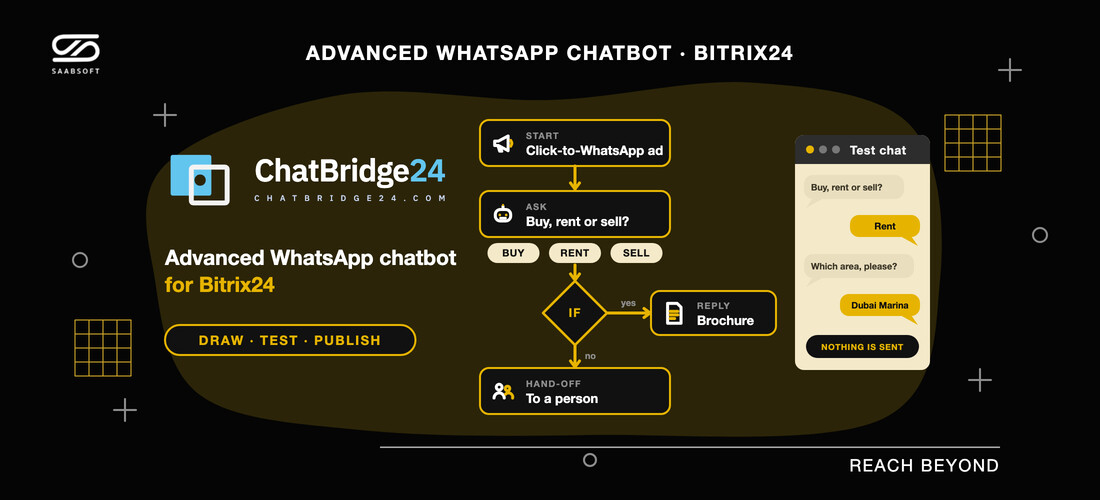
What makes a WhatsApp chatbot advanced, and how the ChatBridge24 Bitrix24 App lets UAE teams draw, test and publish one that qualifies leads and hands them over.
Most WhatsApp bots are a greeting followed by a menu. An advanced WhatsApp chatbot goes further: it collects the details your sales team needs, checks each answer, takes a different route for each kind of customer, and recognises the moment a person should take over. That is the bot built into ChatBridge24, the WhatsApp platform developed by Saabsoft, and it runs inside your portal through the ChatBridge24 Bitrix24 App. This article covers what the bot can do, how to build one with a Dubai property example, and what it costs for companies on Bitrix24 UAE portals.
What makes a WhatsApp chatbot advanced
The word is used loosely, so here is the test we apply. A chatbot deserves it when it can:
- Branch on what the customer says. A condition can send a buyer down one path and a tenant down another, based on an answer, a tapped button, the customer's country, a conversation label, the day or the hour, or whether the chat began with an advert.
- Validate what it collects. A date has to be a date and an email address has to be an email address. When an answer does not fit, the question is repeated in your own wording, up to five times.
- Handle silence. If the customer goes quiet, one reminder can follow, and a customer who never answers can be given a separate route.
- Remember. Each answer is stored under a name you pick, so a later message can greet the customer by name or repeat the area they chose.
- Step aside. A hand-off block gives the chat to your team, and a customer who types a word such as agent or human in the middle of a question can be sent there at once.
What the bot leaves out matters as much. It never composes replies with AI, because every message it sends is text you wrote. And it never messages anyone first: it responds to customers who write to you or tap a button on one of your templates. To reach people who have not written, you use approved templates and campaigns, which our guide to WhatsApp marketing in Bitrix24 explains.
Inside the scenario builder
Each conversation the bot runs is called a scenario, and you draw it on a canvas rather than write code. The blocks fall into four groups:
- Messages: text with as many as three reply buttons, or a list offering up to ten choices, a link button, a request for the customer's location, and images, videos or documents from the number's own library, such as a brochure or a price list.
- Ask: an open question, or a menu of buttons or list items, and each answer is validated by type: number, email, phone, date, location, file, or yes/no.
- Logic: conditions, business hours that know your weekends and public holidays, waits, saved values and jumps to another block.
- Flow: carry on in a different scenario, end the conversation, or hand it to a person.
A single number can hold twenty scenarios, and each can reach 150 blocks, which leaves room for a full menu with every question and every route back.
An example: a Dubai brokerage answering ad leads
Picture a brokerage running click-to-WhatsApp adverts for apartments in Dubai Marina. Leads arrive at every hour, and their first questions repeat. One scenario can take that first part of the conversation:
- Start whenever a chat comes from a click-to-WhatsApp advert.
- Ask "Are you looking to buy, rent or sell?" with three buttons.
- Ask "Which area, please?" and keep the reply as the customer's area.
- Check the answers. A buyer interested in the advertised project gets its brochure as a PDF straight away.
- Hand over tenants, sellers and every buyer who wants a viewing to an agent.
Outside office hours, a business hours block can tell the customer when the team will be back, while the scenario still records the enquiry. The agent who picks the chat up reads the whole exchange, so nobody asks the same question twice, and because the scenario began on an advert, the lead's source is already known. Brokerages that run Saabsoft's Real Estate CRM keep that conversation on the same contact as the viewing and the deal.
Choosing when each scenario starts
Every scenario has its own trigger, so different conversations get different openings. A scenario can begin on:
- a keyword, matched as a whole word, the whole message or its opening, in any letter case, with Arabic keywords matched with or without harakat;
- a new contact's very first message;
- a chat opened through a click-to-WhatsApp advert or a landing-page campaign;
- a customer tapping a button in one of your approved templates;
- any message that arrives while your team is closed;
- or any other message, for the scenario that welcomes everyone.
You can run several scenarios on one number at once, in the order you set, and a specific trigger always beats the one that welcomes everyone. You can also cap a scenario at once per contact within a set number of hours, or keep it out of conversations tagged with a label you pick, such as key accounts or a negotiation in progress.
The hand-off to your Bitrix24 team
In Bitrix24, you find the builder on the Bot tab of every WhatsApp Business API number inside the app. When a scenario reaches its hand-off block, the bot leaves that conversation for good, and the chat continues in the Open Channels queue the number is bound to, where your routing rules decide who answers. Agents can also reply from the WhatsApp tab on any lead, deal, contact or company.
Two rules protect your team's conversations. A scenario stays out of any chat a colleague is already handling: if anyone on your team has written to that customer in the last 24 hours, from Open Channels, a CRM card or the ChatBridge24 inbox, the bot does not start. And contacts who opted out, or were blocked by your team, never receive a scenario.
Limits that keep a live number safe
A bot on a busy business number needs firm limits, so a slip in a drawing cannot become a stream of messages or a surprise on your Meta invoice. These are enforced by the engine itself:
- No more than four bot messages in answer to one customer message, and no more than forty in a single run of a scenario.
- Ten jumps per run, so two scenarios cannot keep passing a conversation between them.
- Waits and reminders are capped at 20 hours, so a follow-up to a customer who wrote recently still arrives inside WhatsApp's 24-hour customer service window.
- Free-form messages are sent only while that window is open. After it closes, the bot can send nothing but an approved template, and a scenario without one stops there.
- If two customer messages land together, only one moves the conversation forward, and no message is ever delivered twice.
Test it before any customer sees it
Scenarios are edited as drafts, so the live version stays as it is while you work. In the Test chat you play the customer: type replies, tap the buttons and watch what happens. The bot follows exactly the same rules as on the live number, highlights the block that is answering and lists every stored answer, while nothing is sent and nothing is charged.
Publishing checks the whole scenario and points to the block that needs fixing: an unconnected path, a template not approved on that number, a loop that keeps sending without a reply from the customer, or a message longer than WhatsApp accepts. Published versions are all kept, so you can roll back, and a customer already mid-conversation finishes on the version they began with.
Plans and pricing
You can build and test scenarios on every ChatBridge24 plan. Putting one live on a WhatsApp Business API number needs one of these:
- Professional: $80 a month per number, or $64 a month when billed annually. The shared inbox, templates, the Bitrix24 app and the bot.
- Enterprise: $119 a month per number, or $95.20 a month when billed annually. Adds marketing campaigns and REST API template sends to everything in Professional.
Your whole team is included, with no charge per seat. Meta bills the messages the bot sends straight to your WhatsApp Business Account at its published rates, with nothing added, and Meta has made 1,000 service messages per number free each month since 1 October 2026. See ChatBridge24 pricing for the current plans.
Build your first scenario with Saabsoft
Saabsoft develops ChatBridge24 and is an official Bitrix24 Dubai partner, so we can turn your most frequent WhatsApp questions into a first scenario, connect its hand-off to the right Open Channels queue, prepare the templates the bot falls back on once the 24-hour window closes, and train the agents who take over. You can install the app from the Bitrix24 Marketplace today. If you are still deciding how to connect WhatsApp, read our WhatsApp Business API in Bitrix24 guide, or see the full feature list in the ChatBridge24 launch announcement.
Frequently asked questions
Is the chatbot part of the ChatBridge24 Bitrix24 App?
Yes. Open any WhatsApp Business API number in the ChatBridge24 Bitrix24 App and the builder is on its Bot tab. It comes with the app from the Bitrix24 Marketplace, so nothing else needs installing. Going live needs the Professional or Enterprise plan.
Does the bot write its own replies with AI?
No. The bot only sends text you wrote yourself in its blocks, so customers only ever read your words.
Can it work with customers who write in Arabic?
Yes. Keyword triggers match Arabic with or without harakat, and you write each message in the language your customers use.
What happens when a customer asks for a person?
The bot stops at the hand-off block and the chat continues in your Open Channels queue. If a customer types one of the words you set, such as agent, while the bot is waiting for an answer, they can go straight to that hand-off.