

 Digital Transformation

 Technical Strategy Services
 Foundational Strategy Services
 Information Architecture
 Content Experience & Strategy
 Bitrix24 For Business Automation
 Software Development
 Custom Application Development
 Mobile Application Development
 E-commerce Development
 Website Development
 UI/UX Audit of Site Usability
 Website Technical Support
 Digital Marketing
 Marketing Automation Services
 Search Engine Optimization (SEO)
 Content Marketing & Copywriting
 Paid Search & PPC Management
 Social Media Marketing
 Email Marketing Services
 Research
 Brand Health Research
 Analysis of Brand Competitors
 Target Audience Analysis
 Testing of Design and Concept
 Analytics Setup & Data Analysis
 Foundational Strategy Services
 Information Architecture
 Content Experience & Strategy
 Bitrix24 For Business Automation
 Custom Application Development
 Mobile Application Development
 E-commerce Development
 Website Development
 UI/UX Audit of Site Usability
 Website Technical Support
 Marketing Automation Services
 Search Engine Optimization (SEO)
 Content Marketing & Copywriting
 Paid Search & PPC Management
 Social Media Marketing
 Email Marketing Services
 Brand Health Research
 Analysis of Brand Competitors
 Target Audience Analysis
 Testing of Design and Concept
 Analytics Setup & Data Analysis

 Expertise Overview
 Digital Transformation
 Software Development
 Digital Marketing
 Research
 Products Overview
 Solutions Overview
 Real Estate CRM
 Hospitals CRM & Bookings
 Retail Digital Transformation
 Marketing Automation
 Tasks & Projects
 HR Automation
WhatsApp Marketing in Bitrix24: Campaigns to Your CRM Audience with ChatBridge24
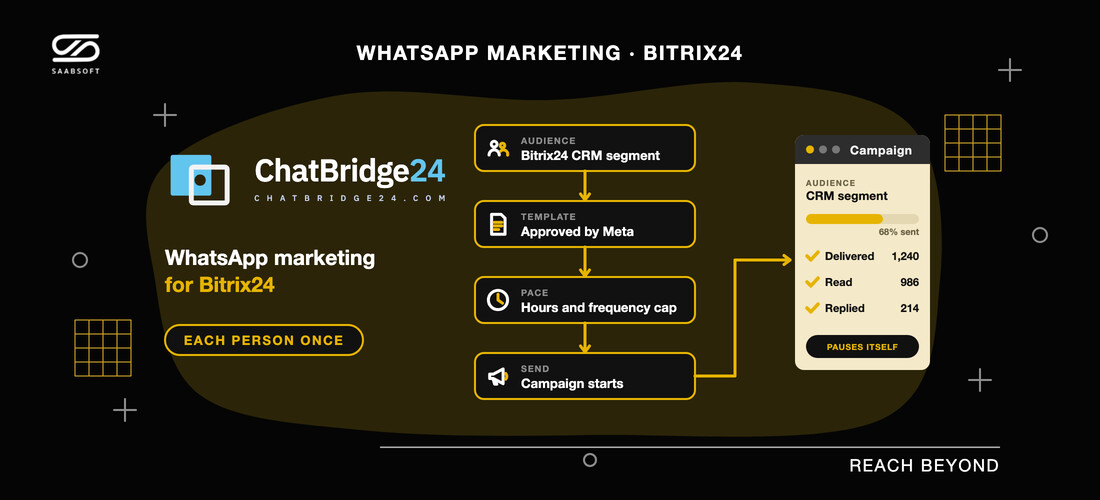
How to run WhatsApp marketing campaigns from your Bitrix24 CRM with the ChatBridge24 Bitrix24 App: consent, approved templates, CRM audiences, pacing, costs and a first campaign.
For most companies in the UAE, WhatsApp is the one channel customers reliably read. The hard part is WhatsApp marketing at volume without losing control: who agreed to hear from you, who has already received the offer, and what happened to each message. ChatBridge24 handles this by running campaigns from the place your customer data already lives. With the ChatBridge24 Bitrix24 App, the audience comes straight from your Bitrix24 CRM and every recipient's result is recorded. Here is how it works, what it costs and how to run a careful first campaign on a Bitrix24 UAE portal.
Why broadcast lists are not enough
Many teams begin with broadcast lists on a phone, or a spreadsheet passed between colleagues. Both fall apart quickly. There is no record of who agreed to be contacted, nobody can tell who already got last week's offer, and when a message fails, no reason comes with it. Running WhatsApp marketing from Bitrix24 treats each campaign as a record instead: a template Meta approved, an audience you can explain, a pace you chose and an outcome for every person.
What you need before the first campaign
- Consent. Write only to people who agreed to hear from you, and keep a note of when and how they agreed. Unexpected messages get blocked, and blocks drag down your number's quality rating with WhatsApp.
- An approved template. Outside the 24-hour window a customer opens by writing to you, WhatsApp delivers only templates Meta has approved. The ChatBridge24 editor shows the message as the customer will see it and checks it against Meta's rules before you submit.
- A number on the WhatsApp Business API. A campaign belongs to one connected number and uses that number's sending limits and template library. Our WhatsApp Business API in Bitrix24 guide explains the setup.
- The Enterprise plan on that number, which is where campaigns are included.
Audiences built from Bitrix24 CRM records
Here the Bitrix24 app earns its place. Instead of exporting a spreadsheet and importing it somewhere else, you build the audience inside the app from your CRM records:
- Record types: contacts, leads, deals, companies or Smart Process items.
- Filters: pipeline and stage, source and type, the responsible person, creation or last-change date, whether the phone field has a value, plus any custom field you added.
- The phone number: leads, contacts and companies use their own phone field, while deals and Smart Process items take it from the linked contact or company.
The app reads Bitrix24 with the permissions of whoever builds the audience, so nobody can add records they could not open themselves. It also refuses rather than guesses: if either the do-not-contact list or the block list is unreadable, the build stops and no audience is created. Other sources work too, including a spreadsheet, a pasted list, the people who have written to the number and the recipients of an earlier campaign. A phone number a spreadsheet stored in scientific notation, such as 9.71E+11, is turned away, because its last digits are already gone.
Fill the template from each record
Every blank in the template takes either one value for all recipients, such as a project name, or a value from each recipient's own data, such as a first name. You decide blank by blank, before choosing the audience, and a template the campaign cannot fill appears disabled with the reason. Every template goes through Meta's review, and Meta may reject or pause it, so it pays to write it with care; most reviews finish within minutes or a few hours.
Pace, sending hours and a frequency cap
Sending too fast, at the wrong hour or too often is how a number loses its quality rating. Each campaign has three controls:
- Pace: the number has an hourly sending rate that all its campaigns share, and each campaign can add its own per-minute rate. Neither limit is ever exceeded.
- Sending window: messages leave only on the days and hours you allow, for example working hours from Monday to Friday.
- Frequency cap: a person who already got a campaign from this number in the last few days, by the count you specify, is skipped.
If a customer opts out, or your team blocks them, while a campaign is running, they drop out of the queue before their turn comes.
Each customer receives it once
A duplicate WhatsApp message costs you twice and irritates a real customer twice. ChatBridge24 reserves every recipient before anything goes out, and records each send before the message is handed to WhatsApp. If sending is interrupted, say by a server restart partway through a batch, a recipient whose message may already have left is flagged for you to check and never sent again automatically, while anyone not yet reached is simply tried again.
Each recipient then shows an outcome with its reason, and grouping the failures by cause makes any pattern obvious.
When a campaign pauses itself
Some problems should halt a campaign instead of letting it run through the list. A campaign pauses, with its list kept intact, when:
- the do-not-contact list is unreadable;
- the template has changed and no longer accepts the values the recipients carry;
- the plan on the number stops covering campaigns, or WhatsApp declines to send over a payment issue on your WhatsApp Business Account;
- the number is suspended, disconnected or not live yet.
Once the cause is fixed, you resume the campaign and the recipients who have not been sent anything continue from where it stopped.
Campaigns, automation rules and the bot together
A campaign reaches many people at once, but everyday WhatsApp marketing in Bitrix24 also depends on one-to-one messages and quick answers:
- Automation rules. The app adds a Bitrix24 automation step that sends an approved template when a lead or deal reaches a stage, filled from the record's own fields with up to thirty values. When it cannot send, the reason appears on the record's timeline.
- A bot for the replies. A good campaign brings replies, often in the evening. A scenario can start when a customer taps a button in your template, answer the common questions and pass the chat to a person. Our article on the advanced WhatsApp chatbot in Bitrix24 shows how.
- Lead tracking. When a customer's first message carries UTM values, they are written into Bitrix24's own UTM fields, so your existing Bitrix24 reports can split new leads by campaign.
If you already automate email and SMS in your portal, WhatsApp slots into the same Bitrix24 marketing automation approach.
What WhatsApp marketing costs
Two separate bills apply:
- Meta charges per delivered template, priced by category (marketing, utility or authentication) and by the recipient's country, and invoices your own WhatsApp Business Account. Marketing templates usually cost the most, while a chat that starts from a click-to-WhatsApp advert opens a free window of up to seven days.
- ChatBridge24 charges per connected number. Campaigns are part of the Enterprise plan: $119 a month per number, or $95.20 a month when billed annually, with your whole team included and nothing added to Meta's rates.
In practice, a campaign costs about its audience size times Meta's marketing rate in each recipient's country, which is one more reason to send to a smaller, well-chosen group. The current plans are on ChatBridge24 pricing.
A first campaign for a Dubai developer
Say a developer is launching a new tower and wants past enquirers to hear first. A careful first campaign could look like this:
- Build the audience from Bitrix24 deals in the off-plan pipeline that were created in the last six months, with each phone number taken from the deal's contact.
- Pick an approved marketing template, with the project name the same for everyone and the first name taken from each contact.
- Allow sending only in daytime hours, at a modest pace, with a frequency cap of fourteen days.
- Let a bot answer the template's Tell me more button and hand serious buyers to the sales team in Open Channels.
- Review the outcome for each recipient before planning the next campaign.
Developers who manage their unit inventory with Real Estate Developers in Bitrix24 keep the campaign reply, the reservation and the contract on the same contact.
How Saabsoft helps
As the developer of ChatBridge24 and an official Bitrix24 Dubai partner, Saabsoft can set up the pipelines, UTM fields and automation rules your campaigns rely on, draft the first templates with you before they go to Meta for review, and run a first campaign alongside your team on a small, safe audience. The app is on the Bitrix24 Marketplace, and the ChatBridge24 launch announcement lists everything else it does.
Frequently asked questions
Can a campaign audience come from my Bitrix24 CRM?
Yes. In the ChatBridge24 Bitrix24 App you build it from contacts, leads, deals, companies or Smart Process items, using filters such as stage, source, pipeline, responsible person, dates and your own custom fields.
Which ChatBridge24 plan includes WhatsApp campaigns?
Enterprise, at $119 a month per connected number, or $95.20 a month when billed annually. Templates themselves can be built and sent one to one from the Starter plan.
Can a customer stop receiving campaigns?
Yes. Customers who opt out, or whom your team blocks, are kept out of every audience, and they leave a running campaign's queue before their turn.
Does Meta charge for marketing messages?
Yes. Meta charges for each delivered template by category and by the recipient's country, billed to your own WhatsApp Business Account. ChatBridge24 adds nothing to Meta's rates.